How to Modify, Skip or Cancel Your AutoInvest Orders
BullionStar’s AutoInvest lets you maintain recurring bullion purchases, with the flexibility to adjust effortlessly as your plans change.
You can modify or cancel your AutoInvest schedule at any time. Update the order frequency, change your payment method, skip upcoming orders, or stop the schedule entirely.
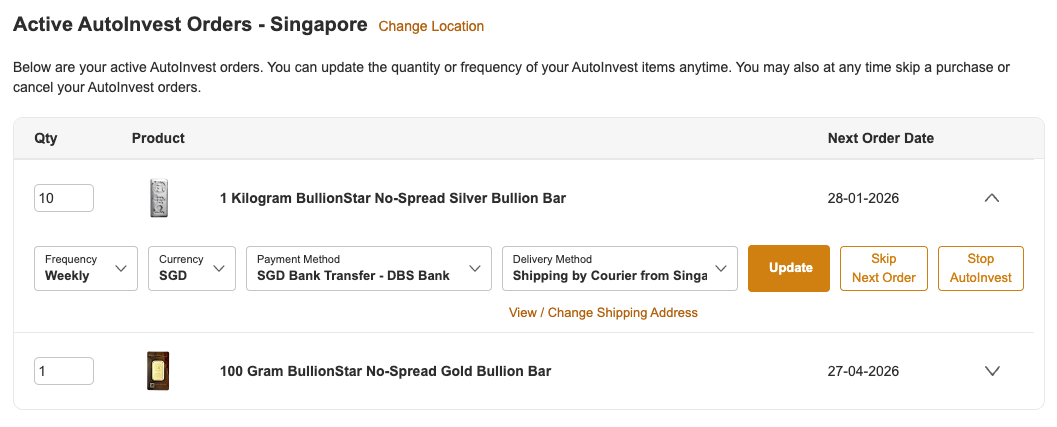
Step 2: This page allows you to modify the quantity, frequency, currency, payment method, and delivery method for each product in your active AutoInvest orders.
Step 3: Click "Update" to save your changes. You will receive a pop-up message confirming that your settings have been updated.
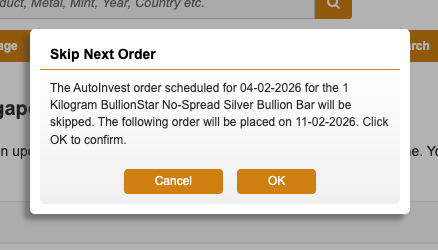
Step 2: Click the "Skip Next Order" button for the item you would like to skip. A pop-up message will appear. Click "OK" to skip the next AutoInvest order for that item.
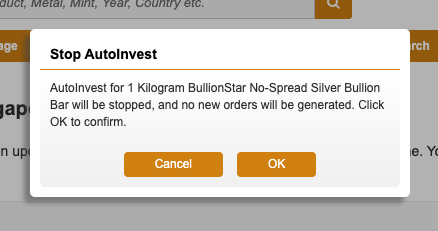
Step 2: Click the "Stop AutoInvest" button next to the item you would like to cancel. A pop-up message will appear. Click "OK" to confirm that AutoInvest for this item will be stopped.
We use cookies to enhance the user experience, analyse traffic and handle essential functionality. By using our website, you accept that cookies are used. Learn more in our Privacy Policy.
 Contact
 Help
Help








 Search