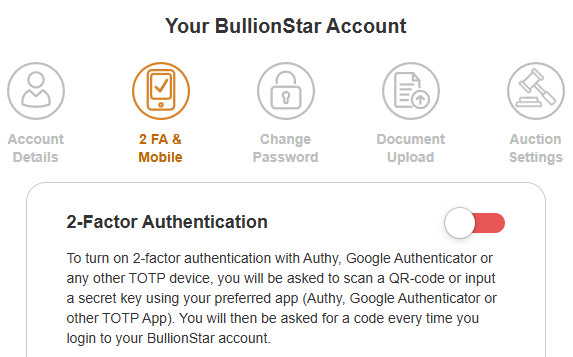
BullionStar provides you with the option of enabling 2-factor authentication when logging into your account.
BullionStar offers you to receive a code via your authenticator app on your mobile phone or tablet every time you attempt to login to your BullionStar account. You will then be required to enter a authenticator code sent to your device to complete the login process and access your account.
2-Factor Authentication can be enabled either when you open your account or at any time thereafter by following the step-by-step guide below.
How to Enable 2-Factor Authentication
Step 1: Login to your BullionStar account and go to Account Details.
Step 2: Click the 2FA & Mobile section icon and enable 2-Factor Authentication by clicking on the slider to the right of the heading so that it turns green.
Step 3: A pop-up appears with a QR-code and a secret key. Open the Authenticator app on your phone or tablet and scan the QR-code. Alternatively, input the secret key using your Authenticator app.
Step 4: 2-Factor Authentication has been enabled. Next time you login to your BullionStar account, you will need to input a an authenticator code to complete the login process and access your account.
BullionStar strongly recommends you to enable 2-Factor Authentication as an additional layer of security to keep your BullionStar account secure.
We use cookies to enhance the user experience, analyse traffic and handle essential functionality. By using our website, you accept that cookies are used. Learn more in our Privacy Policy.
 Contact
 Help
Help







 Search